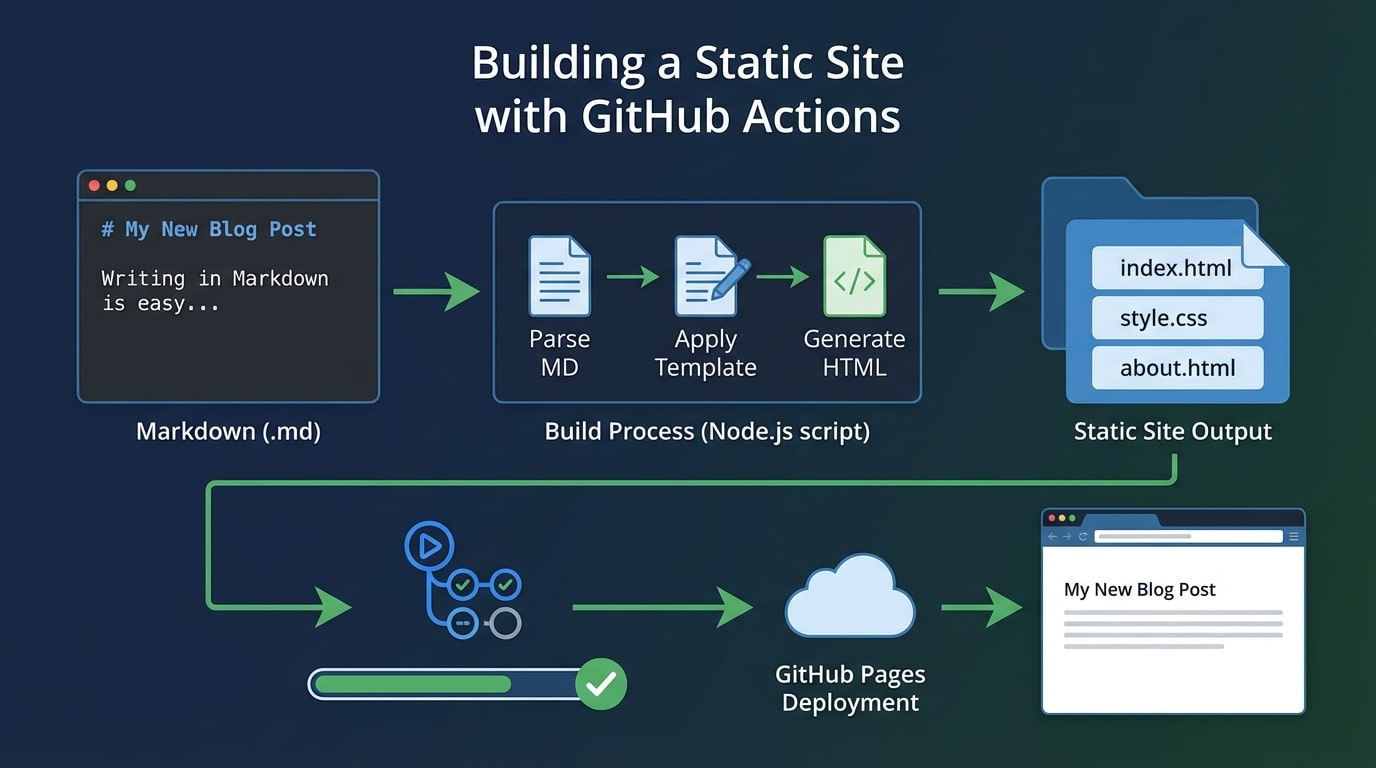
I recently rebuilt my personal site to be as simple as possible while still supporting Markdown for blog posts. Here's how I did it.
The Goal
I wanted:
- Write in Markdown - No dealing with HTML for content
- Static HTML output - Fast, secure, easy to host
- Automatic deployment - Push to GitHub, site updates
- No frameworks - Just HTML, CSS, and a simple build script
The Build Process
The magic happens in a Node.js script that:
// Read markdown files
const files = readdirSync(POSTS_DIR).filter(f => f.endsWith('.md'));
files.forEach(file => {
// Parse frontmatter and content
const { data, content } = matter(readFileSync(file, 'utf-8'));
// Convert markdown to HTML
const html = marked.parse(content);
// Inject into template
const output = template
.replace('Building a Static Site with GitHub Actions', data.title)
.replace('I recently rebuilt my personal site to be as simple as possible while still supporting Markdown for blog posts. Here's how I did it.
The Goal
I wanted:
- Write in Markdown - No dealing with HTML for content
- Static HTML output - Fast, secure, easy to host
- Automatic deployment - Push to GitHub, site updates
- No frameworks - Just HTML, CSS, and a simple build script
The Build Process
The magic happens in a Node.js script that:
// Read markdown files
const files = readdirSync(POSTS_DIR).filter(f => f.endsWith('.md'));
files.forEach(file => {
// Parse frontmatter and content
const { data, content } = matter(readFileSync(file, 'utf-8'));
// Convert markdown to HTML
const html = marked.parse(content);
// Inject into template
const output = template
.replace('{{TITLE}}', data.title)
.replace('{{CONTENT}}', html);
// Write HTML file
writeFileSync(`dist/blog/${slug}.html`, output);
});
GitHub Actions Workflow
The deployment happens automatically with GitHub Actions:
name: Build and Deploy

on:
  push:
    branches: [ main ]

jobs:
  build:
    runs-on: ubuntu-latest
    steps:
      - uses: actions/checkout@v4
      - uses: actions/setup-node@v4
      - run: npm ci
      - run: npm run build
      - uses: actions/deploy-pages@v4
        with:
          path: './dist'
Every time I push to main, the site rebuilds and deploys automatically.
Why Not Use a Framework?
I tried several static site generators (Jekyll, Hugo, Next.js), but they all felt like overkill for what I needed. With just 50 lines of JavaScript, I have:
- Full control over the output
- No unnecessary dependencies
- Easy to understand and modify
- Blazingly fast builds (under 1 second)
The Results
The site now:
- Loads in ~100ms
- Scores 100 on Lighthouse
- Has perfect SEO
- Costs $0 to host (GitHub Pages)
Next Steps
Some ideas for future improvements:
- Add RSS feed generation
- Implement search functionality
- Add syntax highlighting themes
- Create a tags page
The beauty of having your own build system is you can add features exactly how you want them.
Want to see the code? Check out the repository on GitHub.
', html);
// Write HTML file
writeFileSync(`dist/blog/${slug}.html`, output);
});
GitHub Actions Workflow
The deployment happens automatically with GitHub Actions:
name: Build and Deploy
on:
push:
branches: [ main ]
jobs:
build:
runs-on: ubuntu-latest
steps:
- uses: actions/checkout@v4
- uses: actions/setup-node@v4
- run: npm ci
- run: npm run build
- uses: actions/deploy-pages@v4
with:
path: './dist'
Every time I push to main, the site rebuilds and deploys automatically.
Why Not Use a Framework?
I tried several static site generators (Jekyll, Hugo, Next.js), but they all felt like overkill for what I needed. With just 50 lines of JavaScript, I have:
- Full control over the output
- No unnecessary dependencies
- Easy to understand and modify
- Blazingly fast builds (under 1 second)
The Results
The site now:
- Loads in ~100ms
- Scores 100 on Lighthouse
- Has perfect SEO
- Costs $0 to host (GitHub Pages)
Next Steps
Some ideas for future improvements:
- Add RSS feed generation
- Implement search functionality
- Add syntax highlighting themes
- Create a tags page
The beauty of having your own build system is you can add features exactly how you want them.
Want to see the code? Check out the repository on GitHub.